MacGIS Masher
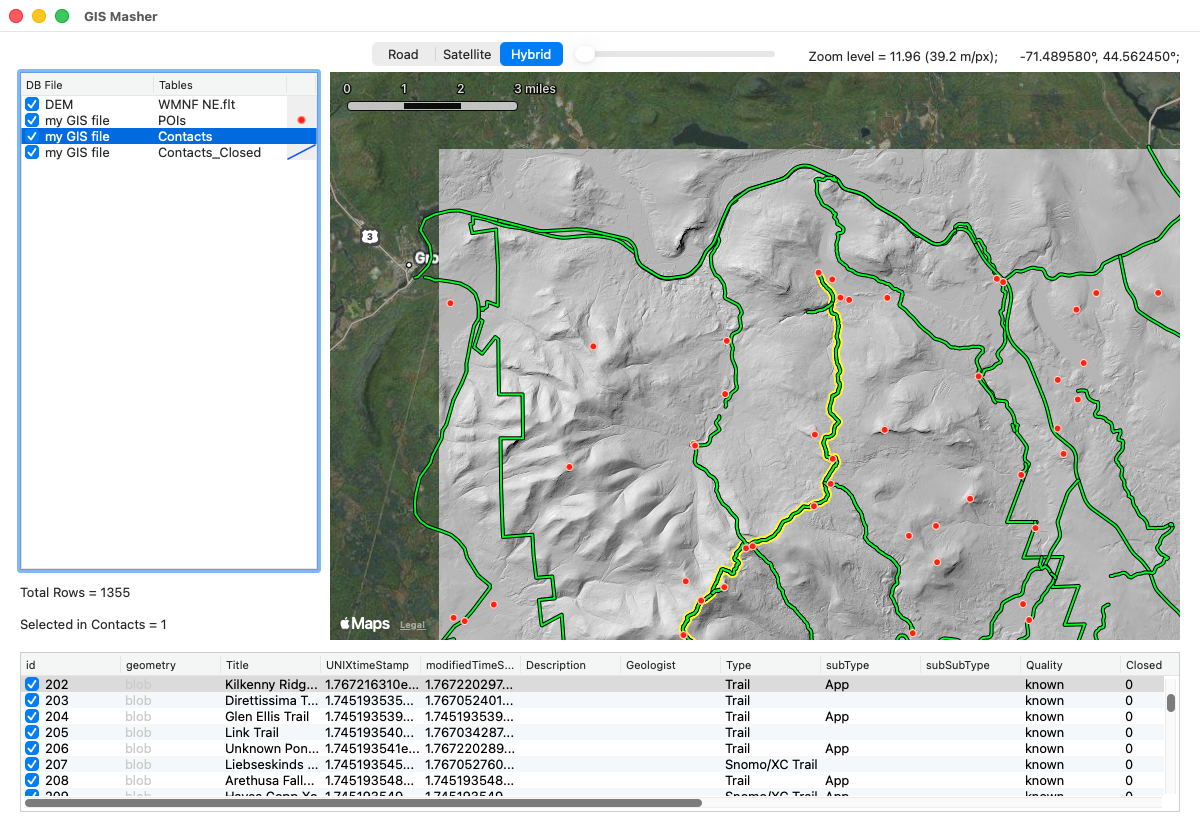
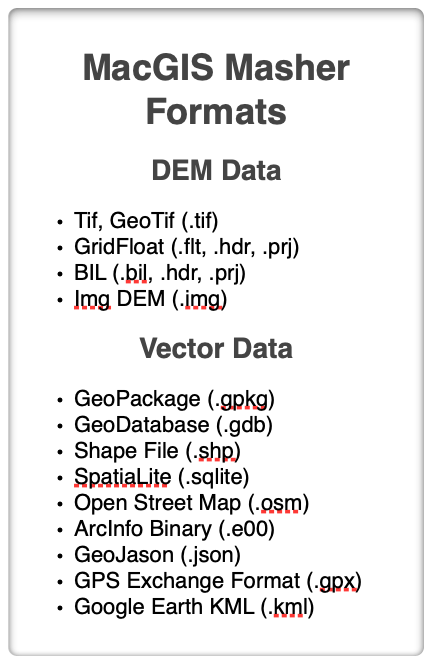
MacGIS Masher will enable you to open several different Vector and DEM formats (Table, right), edit and remove vector GIS records that you don’t need, merge DEMs at different scales, crop them to the area that you want, extract vector contours if you want, and visualize them in color or shaded relief. All this in a small and very easy to use package. But, there is a catch…
In order to use MacGIS Masher, you must install the Geospatial Data Abstraction Libraries (GDAL) from the Open Source Geospatial Foundation. These libraries are free and open source but they do require you to use the Terminal app on your computer to do the installation. Links to downloads for every system are available on the GDAL web pages. Here is a good online tutorial about how to install GDAL. Once you have successfully installed the libraries, MacGIS Masher will enable you to use them without ever having to touch the Terminal again and without having to know a single GDAL command line command. The users manual will help you get the most out of MacGIS Masher and, hopefully, you will find its capabilities reason enough to install GDAL.
MacGIS Masher is only available for Mac OS operating system. Mac users have much more limited GIS options than their Windows-using counterparts. The DEM functionality can be found in my DEM Masher Program which is available for all platforms.
Version History
Version 1.5.0 — 2026.03.27
IMPROVED: Vast speed increase due to numerous optimizations of the code. You are unlikely to notice if your projects have a few hundred records in them but I’ve recently been working with projects that have tens of thousands of records and the speed increase is remarkable!
NEW: You can now export a single merged GIS vector file of a project that has more than one database in it with the File>Export Merged Database menu command. This command is only enabled if (a) you have entered more than one database, and (b) you have Python installed because merging uses a GDAL command that relies on Python.
IMPROVED: The app can now process BIL DEMs in addition to the others. Please let me know if there are other DEM formats that you would like to have included.
FIXED: UTM DEMs were displayed on the Apple Maps base offset from their actual position. This error was cosmetic only as the output DEM file or image had the correct georeferencing. In any case, it has now been fixed and UTM DEMs should display just fine.
Version 1.0.3 — 2026.02.12
FIXED: A few bugs and annoying behaviors have been fixed.
Version 1.0.2 — 2026.02.10
NEW: More contextual menu options
NEW: You can now adjust the size of the two listbox panels to show more or less data
NEW: A new menu option in the DEM Menu to fix DEMs that have NaN (not a number) values for some of their elevations. If you experience an error while texture shading, in particular, it could be because your DEM has NaN values in it and this will fix it!
NEW: Edit a record right in the records table by clicking on the cell you want to edit. The edit is recorded once you exit the cell by tabbing out of it, clicking another cell, or pressing Enter (not return) on your keyboard.
FIXED: some previously undiscovered bugs due to the late addition of some features.
Version 1.0.0 — 2026.02.09 Initial Release!
Open, visualize, edit, and delete records and/or tables from a variety of GIS vector database formats. You cannot edit the geometry information in a record but you can edit just about every other field. Use a powerful find (and replace) function to find records matching multiple criteria and replace found text with text of your choice. GIS Masher never modifies the original database.
Translate from one GIS vector format to another.
Open, visualize, and render images of digital elevation models in three different formats. Visualization includes hill shading, texture shading (gray scale), or color relief with or without contours.
Combine multiple DEMs into a single DEM, resample DEMs, set the no data value, translate the DEM from feet to meters, etc.
Export the DEM in Tif, GridFloat or Img formats, in either a geographic or a spherical mercator project. Export the DEM image as geoTif, png, or jpeg formats.